
Building a HIPAA-Ready Snowflake Data Warehouse in a Weekend
Healthcare data is uniquely challenging. You’re not just building a data warehouse - you’re building a system where a misconfigured permission could expose someone’s HIV status, where a JOIN gone wrong could violate HIPAA, and where “move fast and break things” could mean actual harm to actual patients.
This post walks through building a production-ready Snowflake data warehouse for healthcare analytics, covering the architecture decisions, the Terraform and dbt patterns that worked, and the four frustrating bugs that cost me hours of debugging.
Why Healthcare Data Warehousing Is Hard
Before diving into implementation, it’s worth understanding why healthcare data is different from typical e-commerce or SaaS analytics workloads.
The Compliance Reality
HIPAA isn’t just a checkbox. It’s a fundamental constraint that shapes every architectural decision:
- Minimum necessary access: Users should only see the data they need for their specific job function
- Audit trails: Every access to PHI must be logged
- Data masking: The same table might need to show full SSNs to one role and
***-**-1234to another
The Interoperability Mess
Healthcare data comes in flavors that would make a data engineer cry: HL7v2 pipe-delimited messages from the 1980s, modern FHIR JSON, X12 EDI insurance claims, and CSV exports from EHR vendors.
For this project, I used Synthea, which generates realistic synthetic patient data in FHIR format - the gold standard for healthcare data projects when you can’t use real PHI.
Architecture Decisions
I chose the medallion pattern (Bronze → Silver → Gold) for clear data lineage, isolation of concerns, and failure isolation.
flowchart LR
    subgraph Sources["Data Sources"]
        S1[("Synthea<br>(FHIR)")]
        S2[("EHR<br>Exports")]
        S3[("Claims<br>Data")]
    end

    subgraph Bronze["RAW_DB (Bronze)"]
        B1[(SYNTHEA<br>schema)]
    end

    subgraph Silver["STAGING_DB (Silver)"]
        SV1[(HEALTHCARE<br>schema)]
    end

    subgraph Gold["MARTS_DB (Gold)"]
        G1[(CORE<br>schema)]
        G2[(ANALYTICS<br>schema)]
    end

    subgraph Consumers["Consumers"]
        C1[Evidence<br>Dashboards]
        C2[BI Tools]
        C3[Data Science]
    end

    S1 --> B1
    S2 --> B1
    S3 --> B1
    B1 -->|dbt| SV1
    SV1 -->|dbt| G1
    SV1 -->|dbt| G2
    G1 --> C1
    G2 --> C1
    G1 --> C2
    G2 --> C3

    style Bronze fill:#cd7f32,color:#fff
    style Silver fill:#c0c0c0,color:#000
    style Gold fill:#ffd700,color:#000
The architecture includes:
- RAW_DB (Bronze): Immutable source data from Synthea
- STAGING_DB (Silver): Cleaned and standardized healthcare data
- MARTS_DB (Gold): Analytics-ready dimensional models
Each layer has dedicated roles with minimum necessary access:
| Role | Access | Warehouse | Use Case |
|---|---|---|---|
LOADER_ROLE |
RAW_DB (write) | LOADING_WH | ETL pipelines |
TRANSFORMER_ROLE |
RAW + STAGING + MARTS (read/write) | TRANSFORM_WH | dbt runs |
ANALYST_ROLE |
MARTS (read, masked) | ANALYTICS_WH | BI tools |
The key insight: separate warehouses per role prevents runaway analyst queries from blocking production dbt runs.
Dynamic Data Masking
Snowflake’s dynamic data masking transforms data based on the querying role. Here’s what different roles see:
| Column | TRANSFORMER_ROLE | ANALYST_ROLE |
|---|---|---|
PATIENT_NAME |
John Smith | J* S** |
SSN |
123-45-6789 | *--6789 |
DATE_OF_BIRTH |
1985-03-15 | 1985-01-01 |
The date masking is subtle but important: analysts can still calculate age ranges but can’t identify individuals by exact birthdate.
The Terraform Gotchas
Provider Source Hell
My first major bug: Terraform couldn’t find the Snowflake provider. The issue? When a module uses a provider without explicitly declaring it, Terraform defaults to the hashicorp/ namespace. The Snowflake provider is maintained by Snowflake Labs.
The fix: Add required_providers to every module:
# modules/databases/versions.tf
terraform {
  required_providers {
    snowflake = {
      source  = "Snowflake-Labs/snowflake"
      version = "~> 0.100.0"
    }
  }
}
RSA Key Authentication Formatting
Snowflake’s RSA_PUBLIC_KEY parameter requires:
- Key content only (no headers)
- Single line (no breaks)
- No trailing newline
This awk command saved me two hours of debugging:
awk 'NR>1 && !/END/' ~/.snowflake/rsa_key.pub | tr -d '\n'
dbt Patterns for Clinical Data
The dbt project follows standard medallion structure with one critical macro:
-- macros/generate_schema_name.sql
{% macro generate_schema_name(custom_schema_name, node) -%}
    {%- if custom_schema_name is none -%}
        {{ default_schema }}
    {%- else -%}
        {{ custom_schema_name | trim }}
    {%- endif -%}
{%- endmacro %}
Without this, dbt prefixes custom schema names with your profile’s default schema (HEALTHCARE_CORE instead of just CORE). This macro is essential for explicit schema routing in medallion architectures.
Clinical Data Modeling
Healthcare requires specialized patterns:
- Patient dimension with SCD Type 2 for tracking address changes while maintaining history
- Encounter fact with deduplication to handle multiple data feeds
- Proper date spine handling for length-of-stay calculations
The key learning: don’t reinvent Tuva. If a dedicated team of healthcare data experts has spent years building these models, stand on their shoulders.
Evidence BI Integration
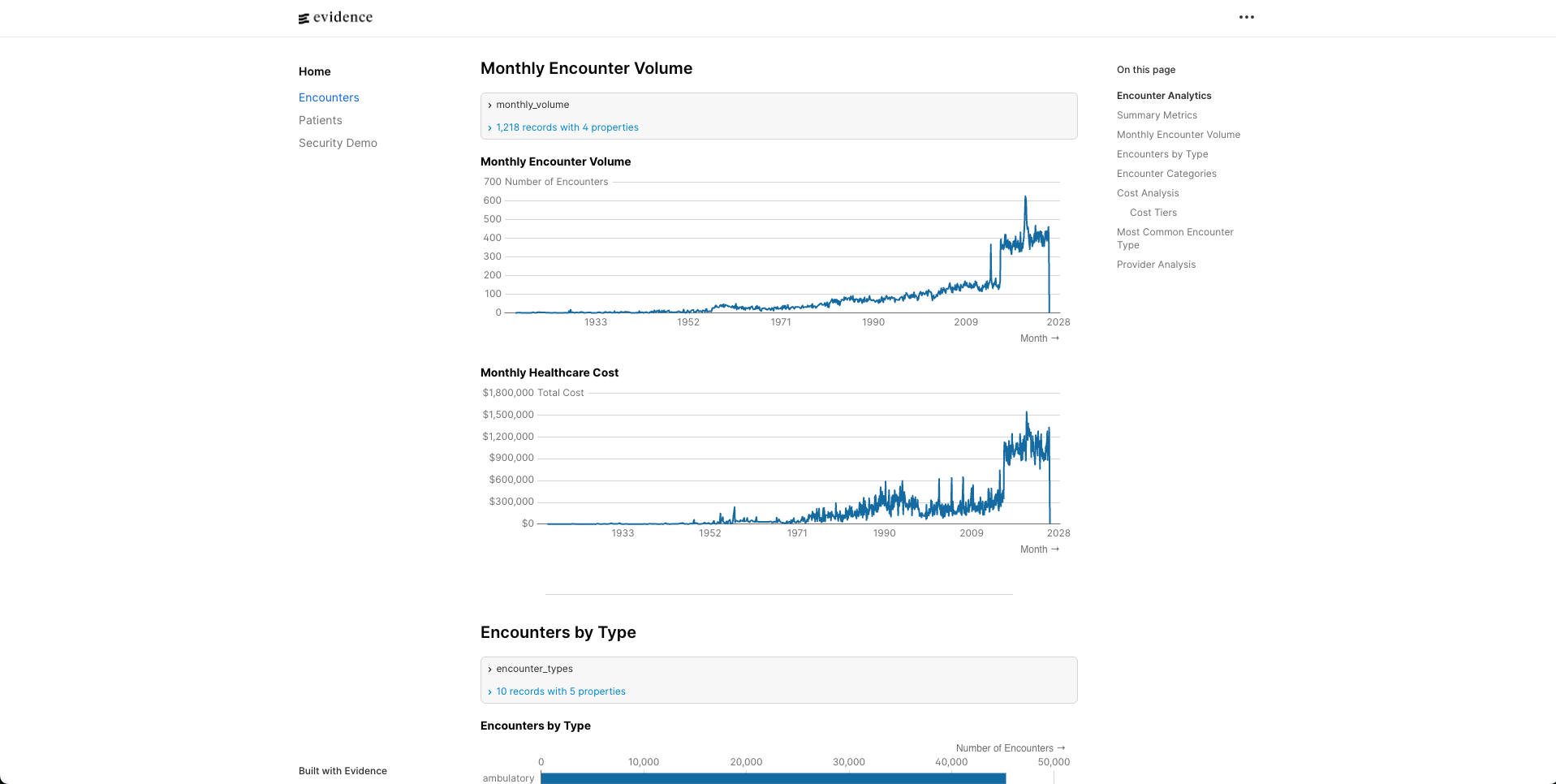
I chose Evidence for the BI layer because it’s code-first (markdown + SQL) and version-controllable.
The critical difference: Evidence doesn’t query your database directly in the browser. It runs queries at build time, caches results in DuckDB, then serves that locally. This means:
- Create explicit source files that reference Snowflake tables
- Reference sources by simple names in markdown (not fully-qualified)
- Pin Evidence versions explicitly to avoid compatibility issues
What Production Needs
This weekend POC proves the concept. Production would add:
- Snowpipe for real-time ingestion instead of batch CSV loads
- Streams and Tasks for incremental processing
- Monitoring and alerting using
ACCOUNT_USAGEschema - Row-level security for multi-tenant access patterns
Lessons Learned
- Infrastructure-as-code isn’t optional for compliance - You can’t pass an audit without proving consistent access controls
- Test with realistic privilege levels - My RBAC tests passed as ACCOUNTADMIN but failed with actual restricted roles
- Pin your versions - Terraform providers, npm packages, Python dependencies all introduce breaking changes
- Healthcare data modeling is a specialty - Use Tuva, don’t rebuild it
The full codebase demonstrates these patterns with all the bugs fixed along the way. Check it out here!
This post documents technical challenges of building a healthcare data warehouse. It is not legal or compliance advice. Always consult healthcare compliance experts when handling PHI.